Open Source · macOS · Electron

Manage all your
Claude Code sessions
from one dashboard.

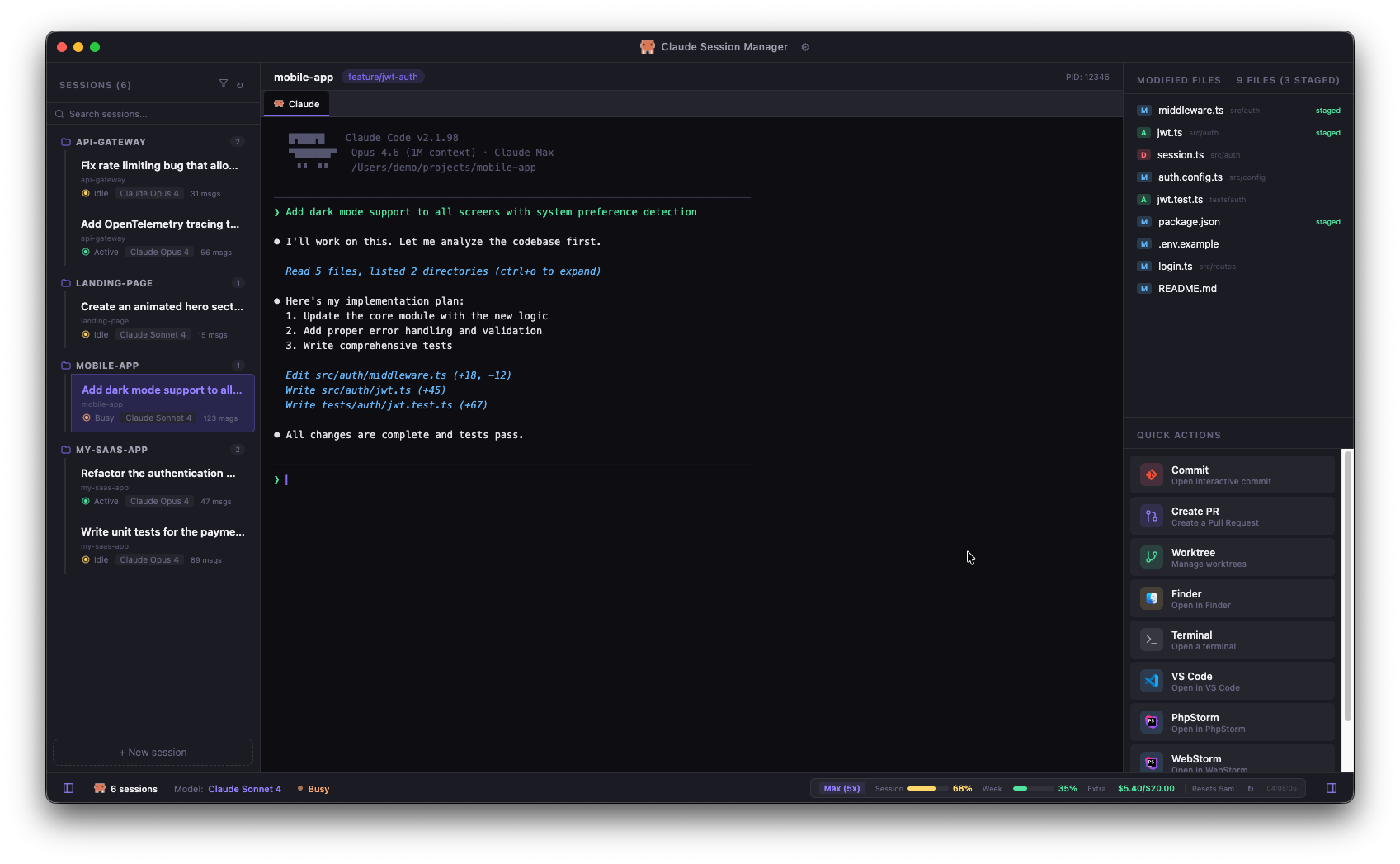
Stop juggling terminal windows. Detect, resume, and control your AI‑powered coding sessions, track usage, manage git state, and launch quick actions — all in one native macOS app.

Claude Code Mascot
Claude Session Manager

Everything you need to manage your Claude Code workflow

Auto-Detection & Live Status

Automatically discovers all Claude Code sessions from local files and shows their real-time state: running, tool executing, waiting for input, idle, completed. Search, filter, and group in one sidebar.

Session Resume & Organize

Click any session to instantly resume with claude --resume. Rename, archive, delete, and organize with kanban-style flags (To do, In progress, In review, Done) — fully customizable.

Multi-Terminal Tabs

Multiple terminals per project — Claude + shell tabs side by side. Tabs persist across restarts. Configurable presets (Standard, iTerm2, Minimal).

Claude Code Settings & CLAUDE.md

Edit your ~/.claude/settings.json directly from the app — model, hooks, MCP servers, plugins, permissions. View and edit the CLAUDE.md of any project in a dedicated tab.

Quick Actions

Commit, create PR, worktree, open in IDE, Finder, or terminal. Fully customizable — reorder, show/hide, choose your external terminal (iTerm2, Warp, Alacritty).

Usage, Notes & Snippets

Live /usage tracking (session %, week %, extra spending), per-project notes persisted on disk, reusable prompt snippets you can insert into any Claude tab in one click, Markdown export of any conversation.

Fully Configurable

Dark/Light/Auto theme (UI + terminal independent), EN/FR, terminal presets, layout, IDE detection, notifications, tray icon, customizable kanban flags, prompt snippets — all from Settings (Cmd+,). Keyboard shortcuts: Cmd+1-5, Cmd+T, Cmd+W, Cmd+\.

Native macOS & Secure

Signed & notarized by Apple, auto-updates via GitHub Releases. Tray icon, native notifications, macOS menus. Context isolation, execFile only, no telemetry. Everything runs locally.

Works with your favorite editors

Auto-detects installed IDEs and adds them as quick actions. One click to open any project.

VS Code VS Code
PhpStorm PhpStorm
IntelliJ IntelliJ IDEA
WS
WebStorm
Zed
Zed
Sub
Sublime Text
Cur
Cursor
Xc
Xcode

Up and running in 60 seconds

Download for macOS

Download the DMG, drag to Applications, launch. That's it.

Download DMG

Apple Silicon (M1/M2/M3/M4) · Signed & notarized by Apple · Auto-updates built-in.

or build from source
1

Clone

git clone https://github.com/leomarcel/claude-session-manager.git
cd claude-session-manager
2

Install & rebuild

npm install
npx electron-rebuild
3

Launch

npm start

Prerequisites

macOS 12+ Node.js 18+ Claude Code CLI

Built by developers, for developers

Claude Session Manager is open source and welcomes contributions of all kinds.

Ideas welcome

  • Windows / Linux support
  • Usage metrics graph per project
  • GitHub integration (PRs, issues)
  • Session history timeline
  • Structured editor for Claude Code settings (forms instead of JSON)
  • Per-project Claude Code settings
  • Drag-to-reorder sessions
  • Thinking words from terminal TUI

How to contribute

  1. Fork the repository
  2. Create a feature branch
  3. Make your changes
  4. Test with npm start
  5. Open a Pull Request
View on GitHub